Skip to content
Moving Day PlannerStart

Moving checklist with dates · one-time purchase

Type your moving date.
Every task lands on the right day.

Not a heap of everything you could do. A timeline counted back from the day the van comes: notice periods, bookings, who to tell and when, the first-night box, the meter readings. Tick it off, put it in your calendar, print it.

  • No account
  • Nothing uploaded
  • Calendar file (.ics)
  • A4 and US Letter
0

42 days

to go · 67 tasks

  1. Catch up now

    15 Oct – 21 Oct

    • Set a moving budget
    • Start a moving folder
    • Give notice to your landlord
    • + 3 more in this stretch
  2. 6 weeks before

    29 Oct – 2 Nov

    • Book the movers and get the confirmation in writing
    • Measure the new place
    • Order packing materials
    • + 5 more in this stretch
  3. 4 weeks before

    5 Nov – 15 Nov

    • Set up a labelling system
    • Start packing what you rarely use
    • List every company and office that has your address
    • + 6 more in this stretch

10 stretches from Thu 15 Oct 2026. Built in your browser.

This is the real planner, not a mock-up. Change the date and watch the days move.

What you get

One date in. A whole move out.

A timeline, not a list

82 tasks in the library, each with the day it usually belongs to. Your answers pick the ones that apply: a tenant never sees “change the locks”, an owner never sees “ask for the deposit back”.

  1. 6 wkBook the movers, in writing
  2. 4 wkBook internet for the new address
  3. 2 wkPlan the first-night box
  4. Day 0Read the meters, make the beds
  5. +3 dAsk for the deposit back

Late?

Catch up now

Moving in two weeks? Everything whose day has passed is gathered in one ordered group at the top. Nothing is skipped for you.

Who to tell, dated

18 kinds of company, each with its usual notice period. The gym wants a month; the bank can wait until you have arrived.

  • School6 weeks before
  • Internet3 weeks before
  • Electricity2 weeks before
  • Bank3 days after

Into your calendar

One all-day event per open task, with a reminder on the morning. Apple, Google, Outlook. Change the date, export again; the events move.

On paper

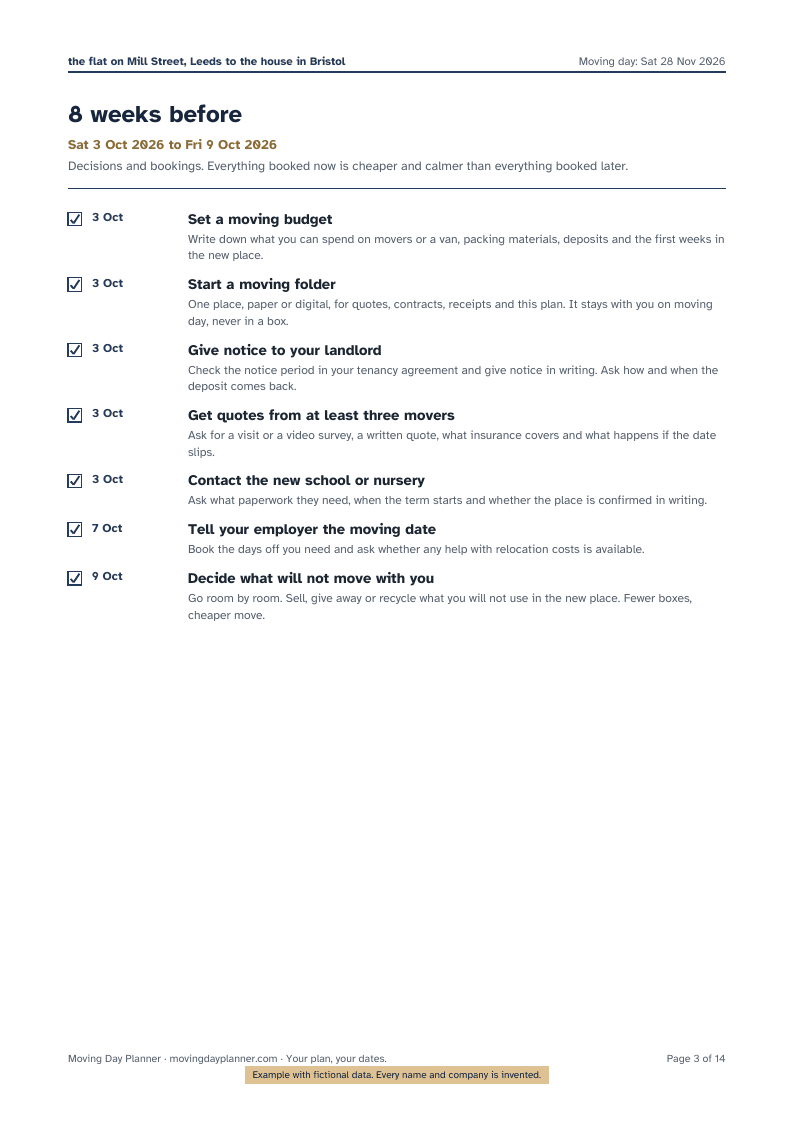
A clean PDF with your dates and ticks, A4 or US Letter. The cover shows the countdown as of the day you print.

A printed page of the example plan: eight weeks before moving day

The shape of a move

10 stretches, from eight weeks before to a month after.

Scroll sideways. “Always” tasks apply to every move; “if” tasks appear only for tenants, owners, families, pets, cars or moves abroad.

014 always · 7 if

8 weeks before

Decisions and bookings. Everything booked now is cheaper and calmer than everything booked later.

  • · Set a moving budget
  • · Start a moving folder
025 always · 5 if

6 weeks before

Confirm the people who will help and gather what the new place needs from you.

  • · Book a van or truck and the people who will help
  • · Book the movers and get the confirmation in writing
038 always · 3 if

4 weeks before

Start packing and start telling people. Services at the new home get booked now.

  • · Start packing what you rarely use
  • · Set up a labelling system
044 always · 1 if

3 weeks before

Pack the rooms you use least and tidy up loose ends around the old place.

  • · Pack the rooms you use least
  • · Return borrowed items, collect anything being repaired
056 always · 1 if

2 weeks before

Confirm everything that was booked and plan the first night.

  • · Confirm the date and time with the movers
  • · Arrange parking for the van at both addresses
065 always · 2 if

1 week before

Pack nearly everything. Appliances off, furniture apart, meters noted.

  • · Pack everything except daily essentials
  • · Note when to read the meters
075 always · 0 if

The last days

The last boxes, the walk-through and a charged phone.

  • · Defrost and clean the fridge and freezer
  • · Pack the last boxes and the first-night box
085 always · 4 if

Moving day

Meters, keys, the walk-through with the movers, beds made by tonight.

  • · Read the meters at the old place and photograph them
  • · Walk the movers through the house before loading
096 always · 5 if

First week after

Services in your name, addresses updated, the kitchen unpacked.

  • · Confirm every service at the new address is in your name
  • · Unpack the kitchen and the bedrooms first
104 always · 2 if

First month after

The long tail: bills, forwarded mail, the last box.

  • · Check the forwarded mail for anyone you missed
  • · Settle up with the movers and check the inventory

Try it

When does the internet company need to hear from you?

Pick a kind of company and what you need from it. The planner knows the usual lead time and puts the call on the right day. In the full planner you add the real names; each one becomes a line on the timeline, a calendar event and a row on the printed who-to-tell page.

Your contracts decide the real notice period. The planner gives you a day to check it by.

21

3 weeks before moving day

Early enough for the usual notice period or installation slot. The day lands on your timeline, in your calendar and on the printed page.

Privacy, in plain words

Your plan stays on your device.

The planner runs in your browser. The preview, the calendar file and the PDF are built there too. The only things that ever leave your device are the payment (handled by Stripe) and a short unlock code that proves you paid.

We test this claim with an automated check before every release: unique made-up entries must not appear in any network request. No account, no cloud copy, no password to lose.

What stays local, what the payment provider sees →

Your device

  1. Plan
  2. Preview
  3. .ics
  4. PDF

Built and saved here. Never sent to us.

Payment

Card details go to Stripe, the merchant of record. We never see them.

Unlock code

A short code that proves you paid. It contains nothing from your plan.

Pricing

Free to plan. Pay once to carry it.

The timeline and the who-to-tell list cost nothing. One-time payments unlock the files. Tax is shown at checkout for your country.

Free

The planner

€0

  • Dated timeline with catch-up
  • Who to tell, dated
  • Your own tasks
  • Preview PDF with a watermark
Start your plan

Most useful

Full Planner

€29one-time

  • Everything in the free planner
  • Calendar file with reminders
  • Clean PDF with your dates and ticks
  • Re-export for two years, any device
Compare and buy

By hand

Printable Binder

€12one-time

  • All 82 tasks, week by week, undated
  • Who to tell, change of address
  • Box inventory, meters, contacts
  • A4 and US Letter
See the binder

Questions

Asked before the first box.

Is this just a moving checklist?
It is a checklist with dates. You enter the moving date; every task is placed on the day it belongs to, counted back from that date. Tasks whose day has passed are gathered under “Catch up now”. You tick things off, add the companies you must tell, and export the whole thing to your calendar and to a printable PDF.
Which countries does it work for?
Any. The tasks are written for a household move anywhere; the few that depend on local rules (voter registration, vehicle registration, residence registration) say so and tell you to check the deadline where you live. You add your own companies and offices, so the who-to-tell list is always yours.
What if my moving date changes?
Change it on the first step. Every task moves with it, ticks are kept, and the calendar file and PDF can be exported again.
Who is behind this?
Divil d.o.o., a small company in Slovenia, EU. Payments are processed by Stripe as merchant of record, which handles tax, receipts and refunds in your country.

Start with the date

The plan is ready before the kettle boils.

One date, six answers, and the whole move has an order.